Coyote Time & Input Buffering: Fairer Platformer Jumps
Coyote time and input buffering make platformer jumps feel fair. Learn how these hidden game feel tricks work, ideal timing values, and how to code them.
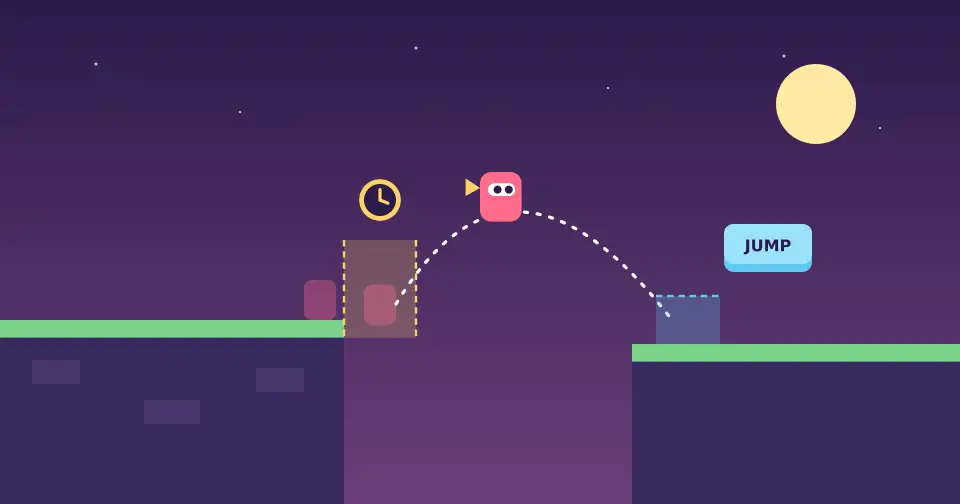
Have you ever pressed jump, felt sure you were still on the ledge, and fallen anyway? Players blame themselves for a moment, then they blame the game. Two small, invisible tricks prevent that frustration: coyote time and input buffering. Most players never notice them, but they feel the difference immediately.
Why precise controls can feel unfair
Games check input frame by frame, often 60 times per second. Human reactions are not that precise. If a player presses jump one or two frames after leaving a platform, the code says "you are airborne, no jump", even though the player's intention was obvious. The game is technically correct and emotionally wrong.
Forgiveness mechanics close that gap between what the player meant and what the code saw. They are a core part of game feel, the small effects that make a game satisfying.
What is coyote time?
The name comes from the classic Wile E. Coyote cartoons, where the coyote runs off a cliff and hangs in the air for a moment before falling. In games, coyote time lets the player still jump for a short window after walking off a ledge.
The player sees a fair jump. Behind the scenes, the game simply remembers when the character last touched the ground.
What is input buffering?
Input buffering solves the opposite problem. If the player presses jump slightly before landing, the game stores that press for a short time and performs the jump on the first frame the character touches the ground. Without it, early presses are silently ignored and the game feels unresponsive.
A famous example: Celeste
Maddy Thorson, a developer of Celeste, shared a list of the hidden helpers in the game's controls. As GIGAZINE's summary reports, it includes coyote time, jump buffering, halved gravity at the peak of a held jump, and corner correction that nudges the player around ledges. The stated goal: widen timing and positioning windows so the game feels better to control.
How to implement both
You only need two timers. Count them down with delta time so they behave the same at any frame rate, as explained in our guide to delta time.
COYOTE_TIME = 0.1   // seconds
JUMP_BUFFER = 0.1   // seconds

update(dt):
  if is_on_floor: coyote_timer = COYOTE_TIME
  else:           coyote_timer -= dt

  if jump_pressed: buffer_timer = JUMP_BUFFER
  else:            buffer_timer -= dt

  if buffer_timer > 0 and coyote_timer > 0:
    velocity.y = JUMP_FORCE
    buffer_timer = 0
    coyote_timer = 0   // prevent double jumps
Engines make this easy. In Godot you can read is_on_floor() from CharacterBody2D, and in Unity you can decrement timers with Time.deltaTime.
Tips for tuning the values
Start around 0.1 seconds. Roughly 5 to 8 frames at 60 FPS is a common starting point. Go higher for casual games and lower for precision challenges.
Reset coyote time after jumping. Otherwise players can jump again in mid-air, which feels like a bug.
Keep it invisible. If players can see the trick, the window is too large. It should feel natural, never like floating.
Apply the idea elsewhere. Buffer attacks, dashes, and wall jumps too. Any action with tight timing benefits.
Test with real players. Watch where people miss jumps they expected to make. Our playtesting tips help you collect honest feedback.
Players remember how a game made them feel, not how strict its collision checks were.
Keep exploring
Forgiving controls pair well with smart level layouts. Read how to teach players without tutorials, or explore the games we make at Ryuartistry.