What Is RAG? How AI Answers From Your Own Documents
What is RAG? Learn how retrieval-augmented generation lets AI answer from your own documents, reduces hallucinations, and how to build a reliable RAG system.
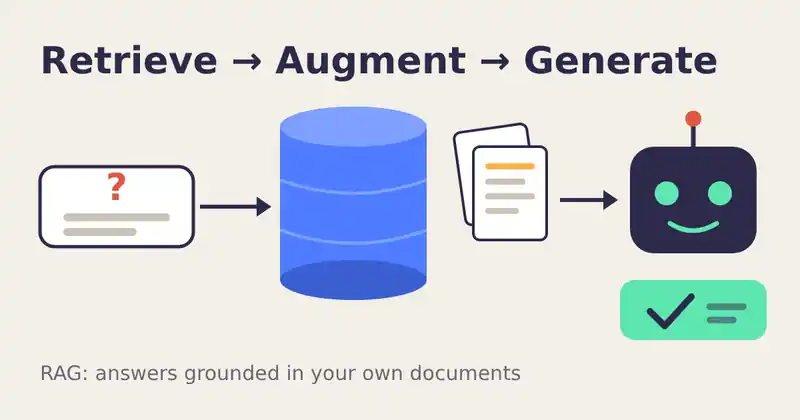
A language model only knows what it saw during training. It has never read your product manual, your company wiki, or last week's price list. So how do customer support bots answer questions about things that are private or brand new? Most of them use a technique called RAG, short for retrieval-augmented generation.
What RAG means
The term comes from the 2020 research paper Retrieval-Augmented Generation for Knowledge-Intensive NLP Tasks by Patrick Lewis and colleagues. The idea is simple: before the model writes an answer, the system first retrieves relevant passages from a trusted source, then augments the prompt with those passages, and finally lets the model generate an answer based on them.
Think of it as an open-book exam. The model still does the writing, but it is allowed to look up the right pages first.
How a RAG pipeline works
1. Prepare the knowledge base
Documents are split into smaller pieces called chunks, often a few hundred words each. Every chunk is turned into an embedding, a list of numbers that captures its meaning. The OpenAI embeddings guide gives a clear introduction to how these vectors measure similarity. The vectors are stored in a vector database or search index.
2. Retrieve
When a user asks a question, the question is embedded the same way. The system finds the chunks whose vectors are closest in meaning and picks the top few results.
3. Augment and generate
The retrieved chunks are inserted into the prompt together with an instruction such as "Answer only using the sources below and cite them." The model then writes a grounded answer.
Why teams choose RAG
Fresh information. Update a document and the answers change immediately, with no retraining.
Private data. Internal files stay in your own storage and are only shown to the model when needed.
Fewer made-up answers. Grounding reduces hallucinations, although it does not remove them completely. Our article on why chatbots make things up explains the root cause.
Citations. Users can check the source, which builds trust. IBM Research highlights this verifiability as one of RAG's main benefits.
Tips for a RAG system that actually works
Chunk with care. Pieces that are too small lose context, and pieces that are too large dilute relevance. Keep headings with their paragraphs and add a little overlap between chunks.
Combine keyword and semantic search. Embeddings capture meaning but can miss exact terms such as product codes. Hybrid search adds a keyword method like BM25.
Add context to each chunk. Anthropic's research on Contextual Retrieval reported that prepending a short explanation to each chunk reduced failed retrievals by 49%, and by 67% when combined with reranking.
Rerank the results. Retrieve a wider set first, then use a reranking model to keep only the most relevant passages.
Allow "I don't know". Tell the model to say so when the sources do not contain the answer. A clear prompt matters here, so see our guide to writing better prompts with context, format, and examples.
Respect permissions. Filter retrieved documents by what each user is allowed to see, so the assistant never reveals restricted files.
RAG, fine-tuning, or long context?
Fine-tuning changes how a model behaves, such as its tone or output format, but it is a poor way to store facts that change often. Very long context windows let you paste whole documents, but they cost more tokens on every request. RAG sits in the middle: it sends only the passages that matter. The AWS overview of RAG describes it as a cost-effective way to keep model output relevant and accurate.
RAG does not make a model smarter. It makes sure the model is reading the right page before it answers.
Keep exploring
RAG is often the knowledge layer inside small, focused assistants. Learn how we design small AI agents that are actually useful, or discover the AI products we build at Ryuartistry.