Debounce vs Throttle: Tame Noisy Events in JavaScript
Learn the difference between debounce and throttle, when to use each for search, scroll, and resize, and how a few lines of JavaScript keep your UI responsive.
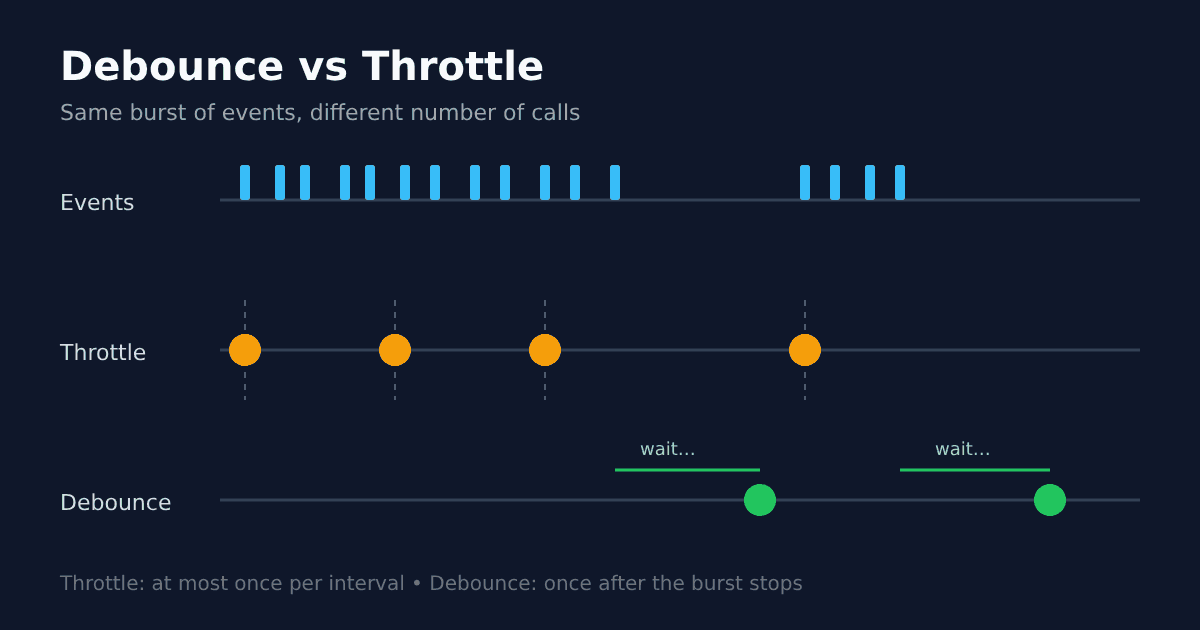
Type one word into a search box and your code may react ten times. Scroll a page and a scroll listener can fire dozens of times per second. If every one of those events triggers heavy work or a network request, your interface starts to stutter. Debounce and throttle are two small techniques that fix this, and every frontend developer should know the difference.
The problem: events that fire too often
Browsers report user activity in fine detail. Keystrokes, mouse moves, scrolling, and window resizing can each produce a stream of events. Usually you do not need to respond to all of them. You only need the result at the right moment.
Doing too much work per event blocks the main thread. That hurts Interaction to Next Paint (INP), the responsiveness metric in Google's Core Web Vitals, which we explain in plain language in our article on Core Web Vitals.
What is debouncing?
Debouncing waits until the events stop. Each new event resets a timer, and the function runs only once the user has been quiet for a set delay.
function debounce(fn, delay) {
  let timer;
  return (...args) => {
    clearTimeout(timer);
    timer = setTimeout(() => fn(...args), delay);
  };
}

const onSearch = debounce((q) => fetchResults(q), 300);
If someone types "design" quickly, only one request is sent, about 300 ms after the last key.
What is throttling?
Throttling sets a maximum rate. The function runs at most once per interval, no matter how many events arrive in between.
function throttle(fn, interval) {
  let last = 0;
  return (...args) => {
    const now = Date.now();
    if (now - last >= interval) {
      last = now;
      fn(...args);
    }
  };
}

window.addEventListener('scroll', throttle(updateProgressBar, 100));
During a long scroll, the progress bar updates steadily every 100 ms instead of on every single event.
Leading and trailing calls
Both techniques can fire at the start of a burst (leading), at the end (trailing), or both. The simple throttle above is leading only, so it can miss the very last event. Libraries handle these edge cases for you: Lodash's debounce and throttle offer leading, trailing, and maxWait options.
Which one should you use?
A simple rule: debounce when you only care about the final value, throttle when you need regular updates during the action.
Search suggestions and form validation: debounce. You want the finished input, not every letter.
Autosave drafts: debounce, so you save after the writer pauses.
Scroll position, infinite scroll, and analytics: throttle, so feedback stays smooth while scrolling.
Window resize layouts: debounce for expensive recalculation, throttle if the layout must follow the drag live.
Button spam protection: a leading debounce or throttle stops double submissions.
The classic CSS-Tricks guide to debouncing and throttling has interactive demos that make the difference easy to see.
Tips and common pitfalls
Create the wrapped function once. Calling
debounce()inside a render or event handler makes a new timer every time, so nothing is ever debounced. In React, keep it stable withuseMemooruseRef.Use requestAnimationFrame for visual updates. For animations tied to scrolling, requestAnimationFrame syncs work to the display refresh, which is often smoother than a fixed timer.
Cancel stale requests. Debouncing reduces requests, but an older response can still arrive after a newer one. Pair it with AbortController to drop outdated fetches.
Pick delays by feel. Around 200 to 400 ms works well for typing. Too long and the UI feels laggy; too short and you gain little.
Clean up. Clear pending timers when a component unmounts so callbacks do not run on a page that no longer exists.
Debounce waits for silence. Throttle keeps a steady beat.
Keep exploring
Small performance habits like these add up to an interface that feels instant. If you are also tidying up your codebase, read our guide to keeping API keys out of your code, or see the software we build at Ryuartistry.